When it comes to research lab web design, the difference between bad and good rarely comes down to aesthetics alone. It comes down to structure. A well-designed lab website organizes complex academic content in a way that is easy to maintain, accessible to all users, and aligned with how research is communicated to the world. A poorly designed one quietly undermines your lab’s credibility, visibility, and recruitment potential.
Here is a practical, side-by-side breakdown of what separates ineffective lab websites from those that actually work.
1. Static Pages vs Structured Content Systems
The most widespread issue in academic websites is relying on manual, static page editing. Content gets pasted in, duplicated across sections, and formatted inconsistently over time.
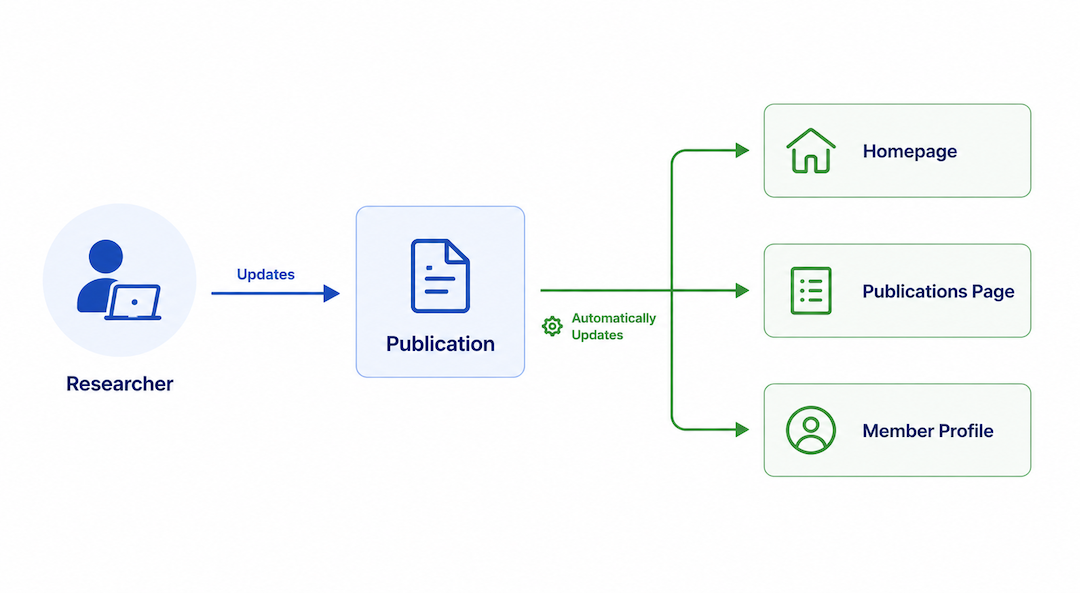
Effective research lab web design treats publications, people, and research outputs as dynamic content types rather than fixed text blocks. As a result, updates happen in one place and automatically appear everywhere they are needed.
What poor design looks like:
- Publications pasted manually into multiple pages
- Faculty profiles duplicated across different sections
- A single update requires editing several pages at once
What good design looks like:
- Publications stored centrally and displayed dynamically
- Lab member profiles managed as structured data
- Content changes that propagate automatically across the site
This shift alone dramatically reduces maintenance time and prevents the content drift that makes many lab sites feel outdated within a year.
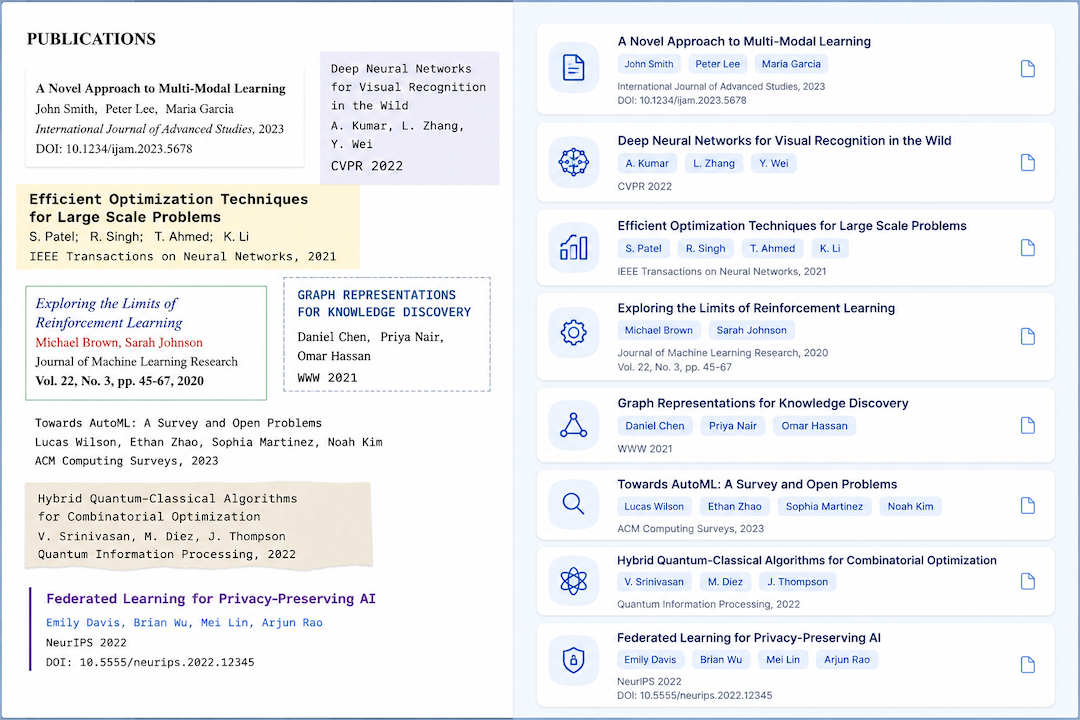
2. Cluttered Navigation vs Intentional Hierarchy
Beyond content structure, bad research lab web design is often characterized by information overload. Years of accumulated content, inconsistent headings, and navigation that mirrors internal lab organization rather than user needs all contribute to a confusing experience.
Good design, on the other hand, builds hierarchy around the people actually visiting the site: prospective students, collaborators, funders, and journalists. Every navigation decision should serve one of these audiences.
Signs of poor hierarchy:
- Dense pages with no clear visual priority
- Navigation labels that only make sense internally
- Inconsistent typography and formatting throughout
Signs of strong hierarchy:
- Content organized by audience intent, not lab structure
- A consistent typographic system that guides the eye
- Clear pathways to key information within two or three clicks
Clarity is not about simplification. It is about intentional organization that reduces cognitive load for every visitor.
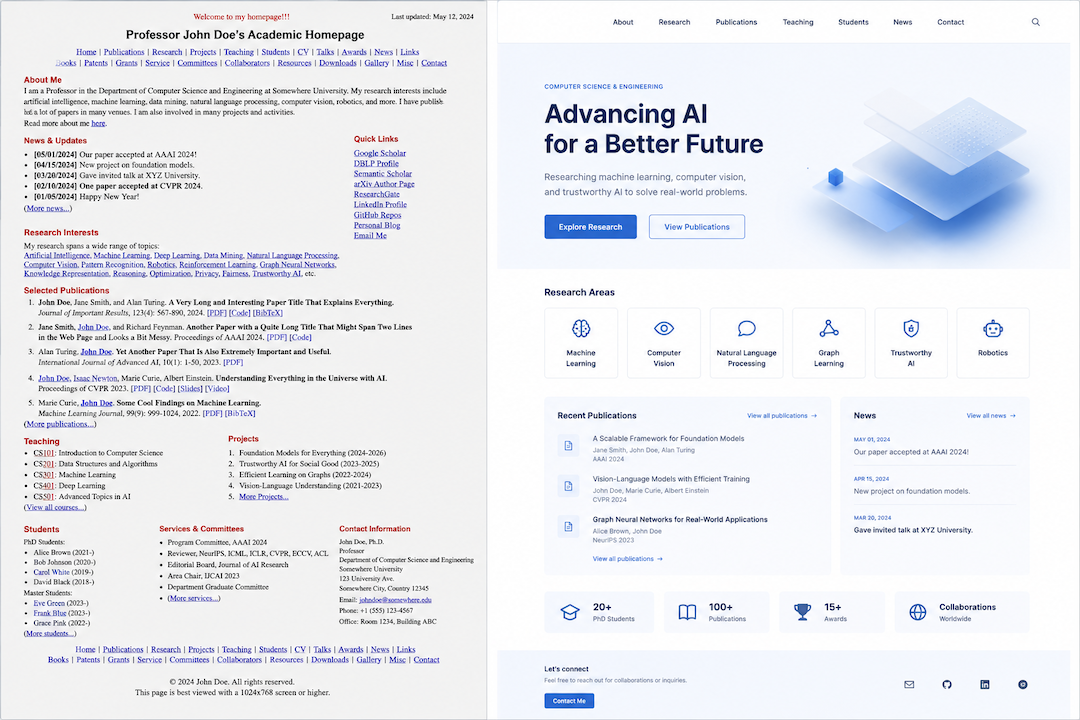
3. Generic CMS Tools vs Academic-Specific Systems for Research Lab Web Design Projects
Many lab websites are built on general-purpose content management systems that were never designed for academic content. Because of this, teams end up with workarounds, manual workarounds for structured data, and long-term inconsistencies that compound over time.
Good research lab web design is built on systems that actually understand the domain. Rather than adapting a generic blogging platform to handle publications and research areas, academic-specific frameworks handle these content types natively.
With generic CMS tools, labs often face:
- No native support for publications, citations, or lab member roles
- Manual structuring of data that should be structured by default
- Heavy customization that breaks during software updates
With academic-specific systems, labs benefit from:
- Built-in content models for publications, people, and research themes
- Workflows that align with how scholars actually produce and update content
- A foundation that scales as the lab grows
4. Accessibility as a Structural Decision
Accessibility is frequently treated as an afterthought in research lab web design, yet for federally funded institutions, it is increasingly a compliance requirement rather than an optional enhancement.
Poorly structured sites often fail basic accessibility standards by default because accessibility was never built into the foundation in the first place.
Common accessibility failures in bad design:
- Missing alt text on images and figures
- Poor color contrast that excludes users with visual impairments
- Navigation that assistive technologies cannot interpret reliably
How good design handles accessibility:
- Semantic HTML that supports screen readers from the ground up
- Consistent contrast ratios and readable font sizing across all pages
- Accessibility baked into templates rather than patched in afterward
Treating accessibility as a structural decision rather than a finishing step enables a site to meet compliance standards without constant manual intervention.
Conclusion: Structure First, Style Second
The gap between bad and good research lab web design comes down to how the site is built, not just how it looks. Structured content, audience-focused navigation, domain-specific tooling, and built-in accessibility create websites that are easier to maintain and more effective at communicating your research.
Labs that move away from manual, page-by-page editing toward structured, scalable systems are better positioned for long-term growth, compliance, and visibility.
If your current site falls short on any of these fronts, Research Lab Network by Pendari was designed specifically to address these structural challenges without relying on manual page editing.